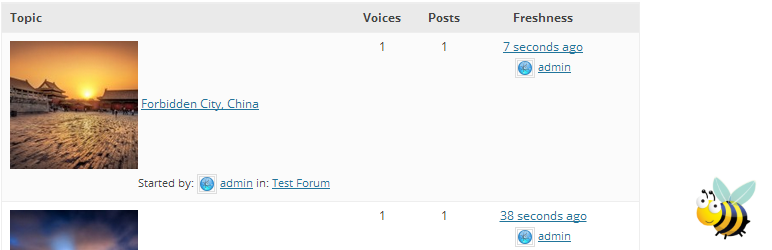
目前有 2 种方法可以为 bbPress 帖子添加自动缩略图:
内容目录 / TOC
第一种,下载 bbPress Topic Thumbnails 插件
- 下载链接:https://downloads.wordpress.org/plugin/bbpress-topic-thumbnails.1.2.zip
- 官方链接:https://wordpress.org/plugins/bbpress-topic-thumbnails/
bbPress Topic Thumbnails 插件为 bbPress 添加了主题缩略图支持。它通过从每个主题中获取第一张图片,并在索引页上与主题标题一起显示来实现功能。缩略图的大小根据您在 WordPress 媒体设置中的默认“缩略图”大小进行调整。如果您使用响应式 WordPress 主题,图片也会相应地调整大小。
此插件兼容 GD bbPress 附件以及大多数其他 bbPress 图像管理插件。
如果在 bbPress 被禁用(或未安装)的情况下启用此插件,它将显示警告信息。
第二种,通过修改主题 functions.php 文件
通过在 WordPress 主题的 functions.php 文件中添加下面的代码,帖子缩略图的具体大小,通过修改第 14 行的代码 echo(‘<img class=”bbp-topic-thumbnail” width=”100%” style=”max-width:
/*Display a warning if bbPress not installed*/
add_action( 'admin_notices', 'bee_thumbs_admin_notice' );
function bee_thumbs_admin_notice(){
	if (!is_plugin_active('bbpress/bbpress.php')) {
	 echo '<div class="updated"><p>bbPress has not been activated. Please disable <em>bbPress Topic Thumbnails</em>.</p></div>';
	}
}

/*Hooks into the loop-topic.php output to print image*/
add_action( 'bbp_theme_before_topic_title', 'bee_insert_thumbnail' );
function bee_insert_thumbnail() {

	if((!bee_catch_image() == '')){
     echo('<img class="bbp-topic-thumbnail"  width="100%" style="max-width: ' . get_option('thumbnail_size_w') . 'px; max-height: ' . get_option('thumbnail_size_h'). 'px; vertical-align:middle;" src="' . bee_catch_image() . '"/>');
	}
}

/*Function that retrieves the first image associated with the topic*/
function bee_catch_image() {
  global $post, $posts;
  $first_img = '';
  ob_start();
  ob_end_clean();
  $output = preg_match_all('/<img.+src=[\'"]([^\'"]+)[\'"].*>/i', $post->post_content, $matches);
  $first_img = $matches [1] [0];
  return $first_img;
}